What Should I Automate First? A Simple Guide for Small Businesses
How to work out which jobs to hand to automation, which to give AI and which to keep for yourself
"What can I automate in my business?" It's the question I get asked more than any other. And my honest answer is always the same: I can't tell you. You know what you actually do all week. I don't.
What I can do is show you how to work it out. It takes about an hour, and by the end you'll know exactly where to start.
Step 1: Write down a normal week
Before you touch any tools, grab a notepad and write down everything you do in a normal week that isn't the actual work you're good at. The admin. The copying and pasting. The stuff you do at 10pm because you didn't get round to it.
Next to each job, write roughly how long it takes each week. Be honest. Those five-minute jobs add up.
Then put a number on it: hours a week, times 48 working weeks. Three hours a week on the monthly report is 144 hours a year. Seeing that number written down is usually enough to get people moving.
Step 2: Sort every job into three piles
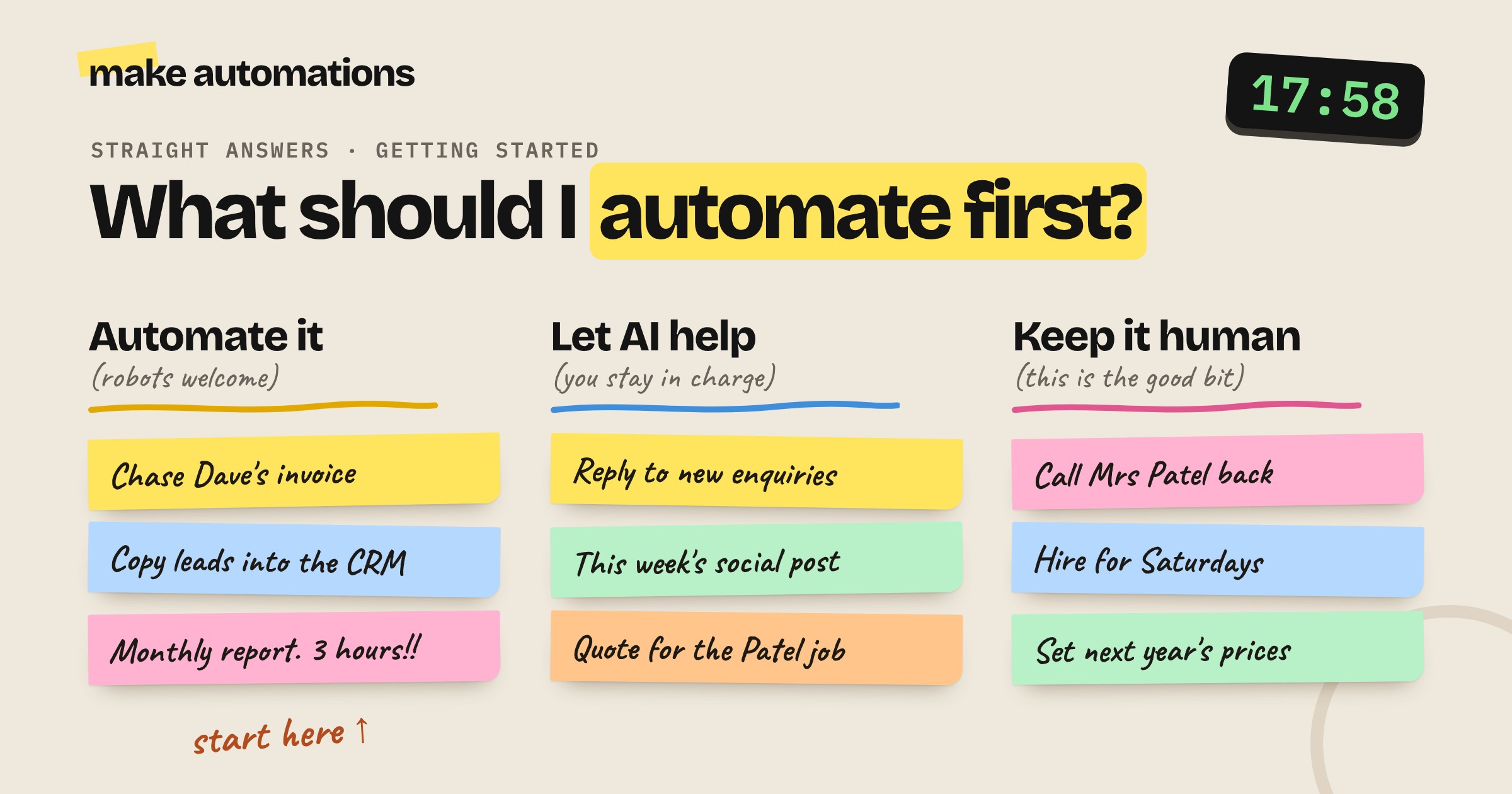
Now go through your list and put each job in one of three piles.
Pile 1: Automate it. The jobs a machine should do. Same thing in, same thing out, every time.
- Copying new leads into a spreadsheet or CRM
- Sending invoices and chasing late payments
- Producing the same weekly or monthly report
- Saving email attachments to the right folder
- Booking confirmations and reminders
Pile 2: Let AI help. AI drafts, you decide. These need a bit of judgement, so AI does the first version and you check it before it goes anywhere.
- Replies to new enquiries
- Quotes and proposals
- Social posts and newsletters
- Replies to reviews
- Summaries of meetings and long documents
Pile 3: Keep it human. The good bit. The work only you should do.
- Calls with clients
- Handling complaints
- Closing a sale
- Hiring decisions
- Setting your prices
That third pile matters as much as the first two. Half of good AI advice is knowing where it won't help.
Step 3: Pick one quick win
Now look at piles one and two and pick one job to start with. Not five. One.
The best first automation is:
- Small. It does one job from start to finish.
- Frequent. You do it every week, ideally every day.
- Annoying. You'll actually notice when it's gone.
- Low risk. If it goes wrong, nothing terrible happens.
Don't try to rebuild your entire sales process on day one. You'll get lost in the middle, it won't work, and you'll give up. Get one simple, easy win first. Once you've had that, you'll start spotting the next one everywhere. Automations are a bit like Pringles. Once you start, it's hard to stop.
The easiest wins for most small businesses
If you're stuck, these are the ones I see pay off again and again:
- Replying to new enquiries. Someone fills in your website form, the automation researches their company and drafts a personalised reply in your inbox within minutes. You check it and hit send. This was the first automation I ever built, and being first to reply wins work.
- Getting leads into your CRM. No more copying details from emails into a spreadsheet.
- Chasing invoices. Polite reminders go out on schedule so you don't have to have the awkward conversation.
- Drafting review replies. Every review gets a response, and AI takes the emotion out of replying to the bad ones.
- Turning meeting notes into tasks. The actions end up in your task list instead of lost in a notebook.
- Repurposing content. We drop each podcast episode into a folder and the titles, descriptions, newsletter and LinkedIn post are drafted within a couple of minutes.
Start with what you already have
You don't need to buy a load of new software. Look at what you already use: your website form, your inbox, your CRM, even a Google Sheet. That's your starting point.
If it has an API or a ready-made connection in Make, it can be automated. Only once you've tried that is it worth asking whether you need a different tool.
How to plan your first automation
Before you build anything, answer two questions:
- What starts it? A form being filled in, an email arriving, a new row in a sheet, a set time each week.
- What's the end result? A draft in your inbox, a record in your CRM, a message in Slack.
Once you know how it starts and where it ends, the middle is just connecting the dots.
Then build it one step at a time, testing as you go. I used to build the whole thing and test it at the end, and when it didn't work I'd spend ages unpicking it. Build the first step, check it works, then carry on.
What not to automate
Some jobs aren't worth it:
- Things you only do once or twice a month. I once spent hours building a complicated booking system for one or two bookings a week. I could have just done them myself.
- Messy processes. If your team does it differently every time, an automation can't follow it either. Sort the process out first.
- Anything in the keep it human pile. Just because you can doesn't mean you should.
How long does it take?
Less time than you'd think. A simple first automation, like a form going into your CRM with a drafted reply, is usually an afternoon's work once you know your way around the platform.
This is where small businesses have the advantage. A big company needs meetings, sign-off and an IT team. You can have an idea in the morning and have it built, tested and running by the afternoon.
Do I need to be technical?
No. Automation platforms like Make are drag and drop. If you understand what information goes in and what you want to come out, you can build it. If you can explain a job clearly to a new member of staff, you can explain it to an automation.
My advice
Grab a notepad this week and write down your admin. Sort it into the three piles. Pick the one job in pile one that annoys you most and automate that.
Then go home on time.
If you want to go further, our beginner course, Where to start with AI in your business, walks you through this exact process step by step, with the worksheets to go with it.
Questions people also ask
What should I automate first in my small business?
Start with one small, repetitive job you do every week that needs the same result every time, such as replying to new enquiries, getting leads into your CRM or chasing invoices. Pick the one that annoys you most and is low risk if it goes wrong.
How do I know which tasks to automate?
Write down everything you do in a normal week and how long each job takes. Anything that's repetitive and gives the same output every time is a good candidate for automation. Jobs that need judgement can use AI to draft, with you checking. Relationships and decisions stay human.
What are the easiest wins with AI for small businesses?
Drafting replies to new enquiries, moving leads into your CRM, chasing invoices, drafting review replies, turning meeting notes into tasks and repurposing content across channels.
How long does it take to set up an automation?
A simple first automation usually takes an afternoon once you know your way around a platform like Make. Learning the platform itself takes a week or two of practice.
Do I need a tech person to use AI and automation?
No. No-code platforms like Make are drag and drop. If you know what information goes in and what result you want out, you can build it yourself.
Should I automate everything?
No. Don't automate jobs you only do once or twice a month, processes that change every time or anything that needs a human relationship, like complaints, sales and hiring.